Many Shopify stores hover around “fine”, and “fine” doesn’t pay your ad bills. Top performers win on boring details done well, speed, UX, and checkout flow.


Shopify runs a big chunk of the eCommerce world for a reason. The scalable Shopify platform handles the unglamorous bits like PCI compliance, updates, and stability, so you can focus on products, content, and marketing that actually moves revenue.

Hosting and security are handled at platform level, which keeps Shopify development focused on storefront UX, not server babysitting.

Shopify’s CDN and modern delivery stack help pages load fast, and then Shopify speed optimisation takes it the rest of the way.

Shop Pay, one-page checkout, and native wallets make Shopify store optimisation easier, because the platform already wants checkout to work.

Subscriptions, loyalty, B2B logic, reviews, bundling, it’s all available through Shopify app integrations, as long as you don’t turn your store into a plugin zoo.

Hydrogen and Remix can bring React speed with Shopify commerce logic, when the project actually needs it.

weeks for the webshop design
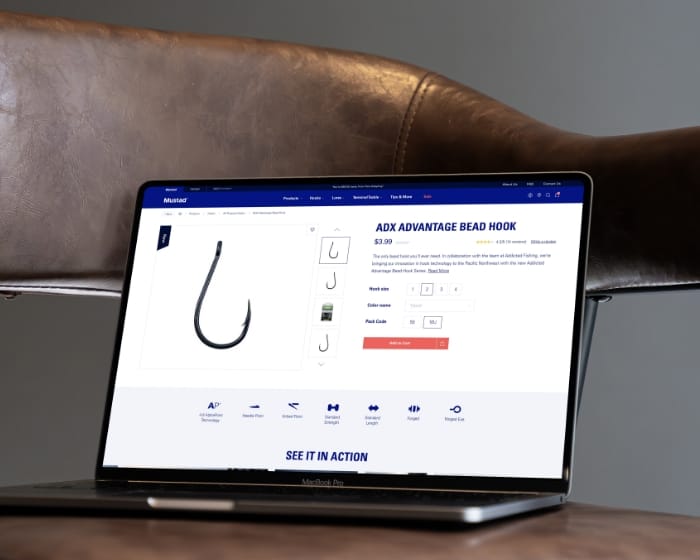
Mustad Fishing multibrand eCommerce website design

months from kickoff to launch
TheWesCape: custom WooCommerce website for outdoor tent brand

months from kickoff to launch
B2B artificial grass eCommerce WordPress UX design and development for AGN

to a WooCommerce store with a smooth mobile checkout
Tubble inflatable bathtub WooCommerce website design
Shopify development gives you a flexible toolkit for fast launches and global selling, without rebuilding your whole business every time you want a new feature. Most wins come from Shopify store optimisation, Shopify speed optimisation, and better flows, not “another redesign”.
A simple, repeatable process that keeps projects moving, and keeps stakeholders calm. We build with Shopify development best practices, then we apply Shopify store optimisation and Shopify speed optimisation so the store performs after it goes live, not just in screenshots.
01
We map products, audience, constraints, and targets, then define a Shopify roadmap that fits reality.
02
Wireframes and prototypes in Figma, focused on navigation, product discovery, and checkout flow.
03
Online Store 2.0 builds in Liquid or Hydrogen, brand assets, metafields, and app integrations done cleanly.
04
Payments, shipping, subscriptions, B2B logic, then QA across devices, performance, security, and accessibility.
05
Zero-downtime launch, Core Web Vitals monitoring, A/B testing where it matters, continued Shopify store optimisation and Shopify speed optimisation as you scale.
From the University of Twente and Creditsafe to Sokkies, FlevoDirect and AGN, and through an agency KPN, Wortell and Ziggo as well. And a few hundred companies you’ve probably never heard of, but who got properly looked after all the same. That, on reflection, is the whole story.










We support startups, scale-ups, and established teams with Shopify builds focused on outcomes. As a Shopify development company, the work is usually new theme development, performance optimisation, and ongoing iteration on a platform that doesn’t fight you.
5.0

“Collaborating with Studio Ubique proved to be an outstanding experience. … The website they developed not only met but surpassed our expectations, seamlessly blending contemporary functionality with vintage allure.”
5.0

“Lennart and the team continue to do really excellent work! They are great at taking direction, but also willing to advise when ideas clash with good design. A great team to work with.”
5.0

“They consistently exceed expectations in addressing our needs and ensuring satisfaction with the outcomes.”
5.0
“We've partnered with Studio Ubique for a wide array of projects and services that have left a profound mark on our brand. … The collaboration has been marked by efficiency, clear communication, and a shared commitment to achieving exceptional results.”
5.0
“Studio Ubique's team demonstrated a remarkable ability to grasp our requirements and vision, and they responded promptly to our feedback. … It was a highly effective collaboration that led to the achievement of our objectives for the AGN website redesign and development.”
5.0
“I've been thoroughly impressed with their products.”
The questions that come up most often, answered here. Yours not among them? Just ask, there's a human on the other end.
Depends on theme complexity, the number of apps and integrations, languages, and migration scope. Most projects land between €5,000 and €25,000, larger builds go up to €100,000+. The Shopify subscription is separate from the build cost. Hourly rates run €60 to €65 across theme development, integration engineering, UX, and project management. Our pricing page covers the broader rate structure across all services.
A Shopify store typically goes live 10 to 16 weeks after kickoff. Headless builds, custom checkout, ERP integrations or a platform migration can take longer, and the plan says so up front. The variable that surprises clients: product catalogue cleanup takes longer than expected. Migrating product data from Magento, WooCommerce, or BigCommerce into Shopify usually exposes inconsistent variant structures, missing metafield data, broken image references, and duplicate SKU schemes that all need decisions before import scripts run. Most projects spend 1 to 2 weeks on catalogue audit and mapping before any theme development starts. Our process page covers the project structure across services.
Depends on what your brand and business actually need. Free or paid Shopify themes (Dawn, Sense, Studio, Refresh, plus the paid theme store) work well when the brand is flexible enough to fit an existing template, the product catalogue uses standard variant patterns, the customer journey is predictable (browse, filter, view, add, checkout), and the launch budget is constrained. Most early-stage stores ship on Dawn or a paid theme, customised lightly. A custom Shopify theme makes sense when: the brand has visual identity that no template represents cleanly, product display needs unusual patterns (custom configurators, tiered pricing displays, complex bundle UI), checkout flow needs extensions beyond what apps provide, or the page count is large enough that template constraints become painful. A custom theme costs more, and Hydrogen headless adds to that when React-level performance and frontend control matter. Our pricing page covers the rate structure.
Standard migration approach. First, platform audit: existing product catalogue, customer accounts, order history, custom URL structures, third-party integrations, payment gateway setup, and SEO ranking pages. Second, target Shopify setup: store configuration, payment gateway, shipping zones, tax setup, and theme structure decisions. Third, data migration: products and variants via CSV import or Matrixify, customers (passwords cannot transfer, requires re-onboarding flow), order history if needed for reporting, redirects from old URLs to new URLs. Fourth, integration replacement: payment gateways, shipping plugins, accounting tools, ERP connections, marketing platforms all need Shopify-compatible alternatives. Fifth, SEO preservation: 301 redirects on every URL that ranks, schema migration, sitemap submission. Sixth, parallel running period where staff verify data integrity. Seventh, cutover with DNS switch. Cost depends on catalogue size, integrations, and how much history moves with you. WooCommerce to Shopify is usually the simplest route. Our Magento to Shopify migration guide covers the technical detail.
Depends on the apps, not the count. Some Shopify apps inject heavy JavaScript on every page load (review widgets, popup builders, social proof tools, certain currency converters), and even 3 of those will tank Core Web Vitals. Other apps run entirely server-side or in admin only (shipping label printing, accounting sync, inventory management), and 20 of those will not affect page speed. Practical guidance. Audit each app for storefront performance impact before installing. Use Shopify’s built-in app performance reports. Replace generic apps with theme-level code where the same outcome is achievable (currency display, basic reviews, simple popups). Roll multiple small functions into one app where you can. Most well-optimised Shopify stores run 5 to 15 apps without performance issues. Stores running 25+ apps almost always have at least 3 that should not be storefront-facing. App-level cleanup is a common engagement. What it costs depends on how much needs replacing.
Standard 30-day post-launch monitoring and bug fixes window after go-live. During this window: daily check of error logs and conversion metrics, weekly review of Core Web Vitals and any anomalies, immediate response to broken integrations during business hours. After 30 days, ongoing support moves into one of the Care, Growth, or Partnership packages. Shopify stores need active maintenance: Shopify ships theme API updates regularly that can break custom Liquid code, third-party apps update with breaking changes, payment provider integrations occasionally require re-authentication, and seasonal campaigns (Black Friday, Cyber Monday, holiday season) need performance and capacity preparation 4 to 6 weeks ahead. New features (additional checkout extensions, new app integrations, seasonal campaign templates, multi-region launches) get scoped as separate sprints outside the support package. Automated monitoring runs 24/7, human response during business hours.
Contact
Not everyone likes to write. Rather talk to someone first? Book a 30 to 45 minute intro call through Calendly. It's free, and by the end you'll know whether a proposal makes sense.
Book a first call(opens in a new tab)Tell us what's stuck, what you want to build, or what needs fixing. You talk to someone from sales and someone technical, and we reply within one working day. First a conversation, then a plan, only then a price.